CRM vs spreadsheet: when should your sales team switch?
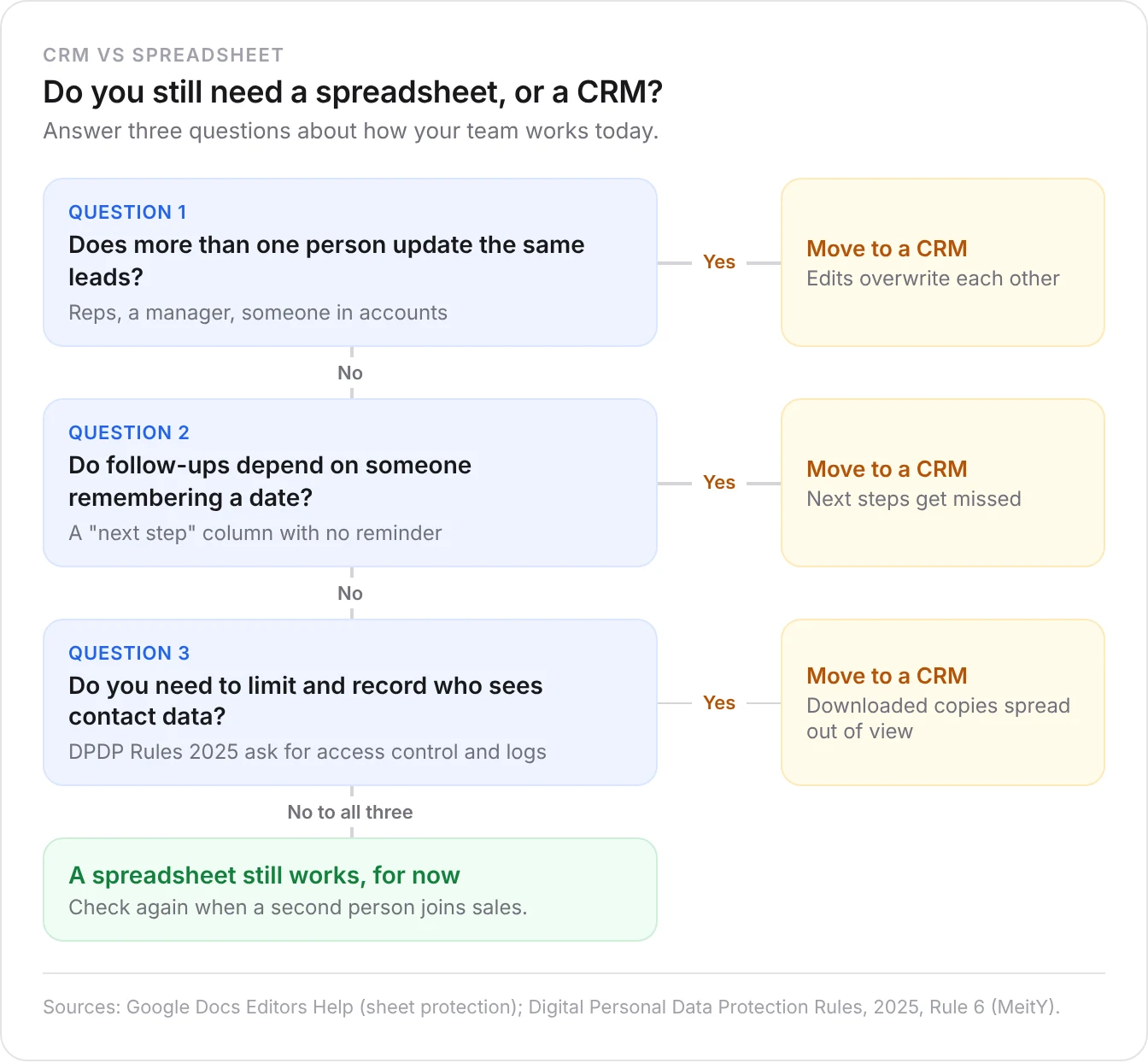
CRM vs spreadsheet comes down to how many people touch your leads. A spreadsheet works for one person and a short list. Move to a CRM when several people update the same leads, follow-ups depend on memory, or you need to control who sees customer data.

CRM vs spreadsheet: when should your sales team switch?
In the CRM vs spreadsheet question, the answer depends less on the number of leads and more on the number of people working them. A spreadsheet is fine while one or two people track a short list. Switch to a CRM when several people update the same leads, when follow-ups depend on someone remembering, or when you need to control who can see and change customer data. A spreadsheet stores rows. A CRM stores relationships, owners and next steps.
What is the difference between a CRM and a spreadsheet?
A spreadsheet is a grid of cells that holds whatever you type into it. A CRM (customer relationship management system) is built around customers: each contact, company and deal has its own record, with the emails, calls, quotes and tasks attached to it in order.
That difference shows up in daily work:
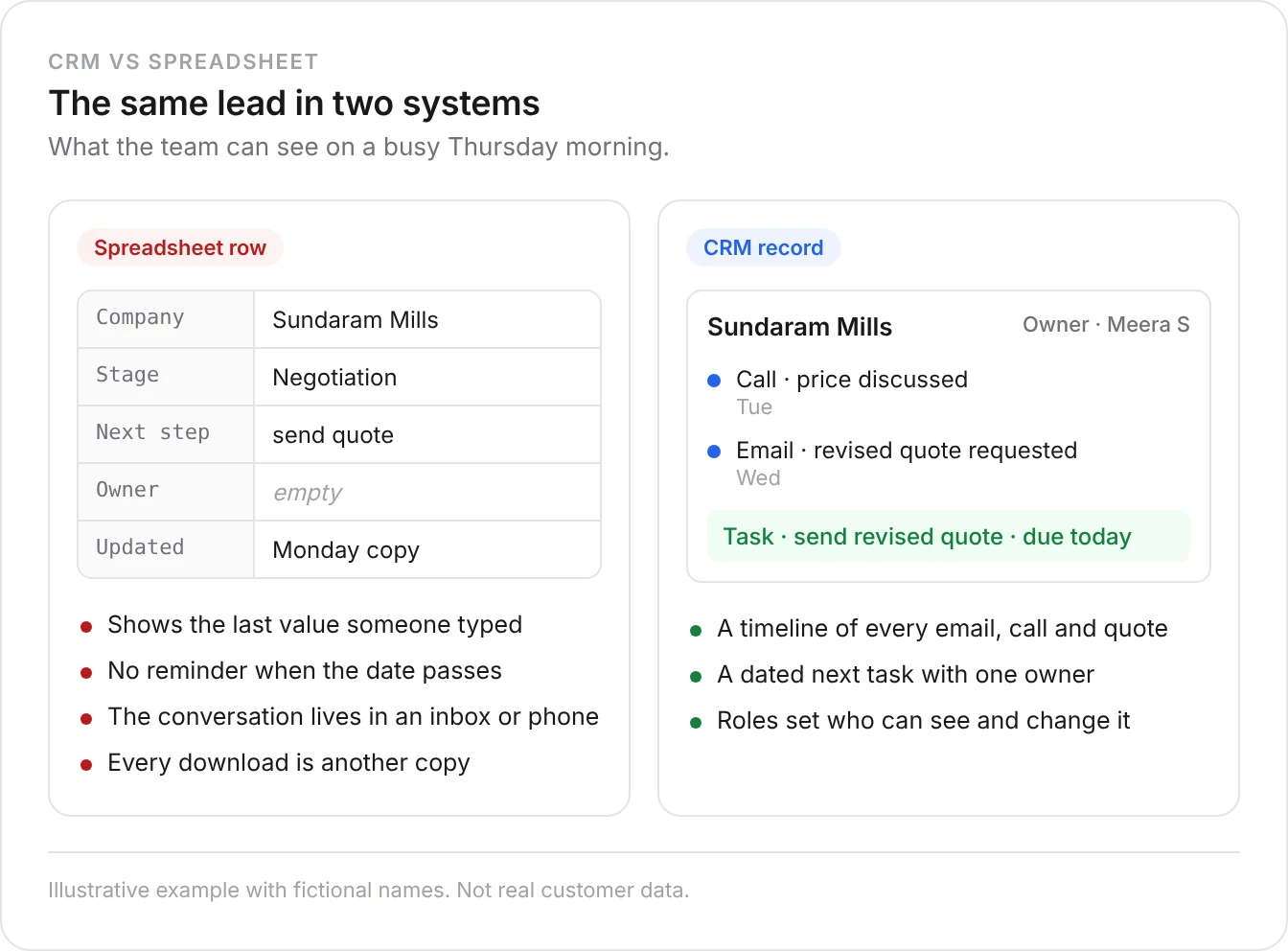
- A spreadsheet row is a snapshot. It shows the latest value someone typed, such as "Stage: Negotiation". It does not show how the deal got there or what was promised on the last call.
- A CRM record is a history. Every conversation sits on one timeline, so anyone picking up the account sees the full story.
- A spreadsheet waits for you. Nothing happens until a person opens the file and reads it.
- A CRM can tell you what needs attention. Tasks, due dates and stalled-deal flags come to the rep instead of the rep going looking for them.
Can Google Sheets or Excel work as a CRM?
Yes, for a while. Many small teams start with a shared sheet, and that is sensible: it is free and everyone knows how to use it.
Spreadsheets also have more controls than people assume. Google Sheets keeps a version history where you can see who updated the file and what they changed (Google Docs Editors Help). You can also restrict who can edit a sheet or a range.
The limits appear when the sheet becomes the team's shared memory. Google itself says sheet protection "shouldn't be used as a security measure", because people can still copy, print, export and import copies of a protected spreadsheet (Google Docs Editors Help). And a version history tells you what changed in a cell. It does not remind anyone to call the customer back.
What are the signs you have outgrown a spreadsheet?
You have outgrown a spreadsheet when the sheet stops answering simple questions quickly: who owns this lead, when did we last speak to them, and what happens next. Watch for these signs:
- More than one person edits the same rows. Two reps update the same lead, and one change quietly overwrites the other.
- Follow-ups live in people's heads. The "Next step" column exists, but nobody is reminded when the date arrives. This is where most follow-ups slip.
- The real conversation is somewhere else. The sheet says "sent quote", but the quote, the reply and the price discussion are in an inbox or on a phone.
- You cannot answer "who changed this?" without digging. A stage moved from Hot to Lost, and finding out why takes a chain of messages.
- New hires get a copy of the file. Every download is another version of your customer list that you no longer control.
- Your weekly review is a clean-up session. The Monday meeting goes on fixing the sheet instead of discussing deals.
If two or more sound familiar, the sheet is costing you more than it saves.
Why do spreadsheet errors matter more in sales?
Spreadsheet errors are common, and people tend to underestimate them. In a review of research on the subject, Raymond Panko reported that the more rigorous field audits of real business spreadsheets found errors in at least 86% of the spreadsheets audited (Panko, EuSpRIG 2000). The same paper describes an experiment where developers put the median chance that they had made a mistake at 10%, yet 86% of them had made one (Panko).
Those studies looked mostly at financial models, not lead lists. The point still holds: people make small errors when they type and copy data by hand. In sales, a small error has a direct cost. A wrong mobile number means a lost lead. A row sorted without its neighbouring columns attaches the wrong owner to the wrong customer.
There is also the time it takes. In Salesforce's State of Sales research, reps said they spend 60% of their time on non-selling tasks, and sales leaders estimated that 19% of their company's data is inaccessible (Salesforce). Keeping a shared sheet tidy by hand adds to that pile.
Consider a fictional company, Kaveri Textiles, with three reps and one shared "Leads 2026" sheet. Meera S updates a buyer's stage on her phone during a visit. Back at the office, a colleague pastes in yesterday's notes from a copy he downloaded on Monday. Meera's update disappears, and the buyer waits three days for a quote that was promised for the next morning. The tool had no way to keep both changes or flag the conflict.
What does the DPDP Act mean for lead spreadsheets?
India's Digital Personal Data Protection Rules expect businesses to control access to personal data and to keep visibility on who accessed it. Rule 6 lists minimum safeguards, including measures "to control access" to computer resources, logs and monitoring to detect unauthorised access, and keeping such logs for one year unless another law requires otherwise (DPDP Rules, 2025, MeitY).
A lead spreadsheet holds names, mobile numbers and email addresses, which is personal data. When that file is downloaded, forwarded on WhatsApp and saved on personal laptops, it becomes hard to say who has a copy, let alone who opened it. A system with roles and records of activity makes those questions easier to answer. We cover the wider rules, and their dates, in DPDP Act for sales teams.
How do you move from a spreadsheet to a CRM without losing data?
Plan the move as a one-time clean-up followed by a clear cut-over date. The most common failure is running both: the CRM goes live, the old sheet keeps getting updated on the side, and within a month nobody trusts either.
A simple sequence that works for small teams:
- Merge duplicates first. Sort by phone number and email, and combine rows that describe the same person or company.
- Give every row one owner. If a lead has no clear owner, decide now. Shared ownership is how leads go quiet.
- Standardise the columns. Agree on the stage names, the date format and how you write company names before you import.
- Import with column mapping. Match each spreadsheet column to a CRM field, such as "Mobile no." to Phone, and check a few records after the import.
- Make the old sheet read-only. Keep it for reference, but stop editing it from the cut-over date.
- Add the next step to every open deal. An imported record with no next action is a spreadsheet row in a new place.
How does HeiGin approach the move off spreadsheets?
HeiGin is an agentic CRM for Indian B2B sales teams. It is designed so that the jobs a team does by hand in a shared sheet happen on the customer record instead:
- CSV import with guided column mapping. Contacts and companies come in from your existing spreadsheet, with each column matched to a field.
- One customer timeline. Every email, call, quote and task sits on the same record, as described on the product page.
- A pipeline that flags itself. Stalled deals and buying signals surface on the pipeline with the reason attached, so nobody has to scan rows for them.
- A Today list built from open loops. Copilot builds each rep's Today list from open loops across their accounts, and each task carries the account and the reason it is there.
- Role-based access and an audit log. Six roles set who can do what, and every agent proposal and action is logged with who approved it. We explain the thinking in how we think about agent trust.
- Your data stays portable. Leads, contacts, deals, activities and documents can be exported as CSV.
You can see what each agent reads and does on the AI agents page.
Frequently asked questions
What is the main difference between a CRM and a spreadsheet?
A spreadsheet stores the latest values someone typed into a row. A CRM stores each customer as a record with a history of emails, calls, quotes and tasks, plus an owner and a next step. That makes a CRM better at telling a team what needs attention, not just what was last written down.
When should a small business switch from a spreadsheet to a CRM?
Switch when more than one person updates the same leads, when follow-ups depend on someone remembering, or when you need to control who can see customer data. Team size matters more than the number of rows.
Can I use Google Sheets as a CRM?
You can, especially at the start. Google Sheets keeps a version history and lets you restrict who can edit ranges. Google notes that sheet protection is not a security measure, though, and a sheet will not remind anyone to follow up, so most growing sales teams move to a CRM.
Is Excel enough for tracking sales leads?
Excel is enough for one person tracking a short list. It becomes risky when the file is emailed around, because each copy turns into a separate version of your customer list. Research also shows that most real-world spreadsheets contain errors.
How do I move my leads from a spreadsheet to a CRM?
Merge duplicates, give every lead one owner and standardise stage names before you import. Then import the file using column mapping, check a sample of records and make the old sheet read-only from a set date. Finally, add a next step to every open deal so nothing stalls after the move.
Does a CRM help with DPDP compliance?
It can help, because the DPDP Rules ask businesses to control access to personal data and keep logs of access. A CRM with roles and activity records makes those questions easier to answer than a file that has been downloaded and forwarded many times. Compliance still depends on your own processes, such as having a lawful basis to contact each lead.
Sources
- Find what's changed in a file (Google Docs Editors Help)
- Protect, hide and edit sheets (Google Docs Editors Help)
- Spreadsheet Errors: What We Know. What We Think We Can Do (Raymond R. Panko, EuSpRIG 2000, via arXiv)
- Sales statistics from the State of Sales report (Salesforce)
- Digital Personal Data Protection Rules, 2025 (MeitY)